• Latest
  • Trending
  • All
  • Market Updates
  • Cryptocurrency
  • Blockchain
  • Investing
  • Commodities
  • Personal Finance
  • Technology
  • Business
  • Real Estate
  • Finance
How to Master VWAP Ultimate Pro MT5 — A Step‑by‑Step User Guide – Analytics & Forecasts – 21 July 2025

How to Master VWAP Ultimate Pro MT5 — A Step‑by‑Step User Guide – Analytics & Forecasts – 21 July 2025

July 21, 2025
Why Everyone Is Suddenly in a ‘Very Chinese Time’ in Their Lives

Why Everyone Is Suddenly in a ‘Very Chinese Time’ in Their Lives

January 20, 2026
IDR Candles Indicator – Trading Systems – 19 January 2026

IDR Candles Indicator – Trading Systems – 19 January 2026

January 19, 2026
Plus500 Halts New CFD Onboarding in Spain amid Tough Marketing Rules

Plus500 Halts New CFD Onboarding in Spain amid Tough Marketing Rules

January 19, 2026
Bitcoin Traders Defend $92K, But For How Long?

Bitcoin Traders Defend $92K, But For How Long?

January 19, 2026
The Race to Build the DeepSeek of Europe Is On

The Race to Build the DeepSeek of Europe Is On

January 19, 2026
OpenAI’s Google Translate killer is here: How to use the new ChatGPT Translate

OpenAI’s Google Translate killer is here: How to use the new ChatGPT Translate

January 19, 2026
investingLive Americas FX market wrap: Vujcic picked as ECB Vice President

investingLive Americas FX market wrap: Vujcic picked as ECB Vice President

January 19, 2026
Michael Saylor Hints at More Bitcoin Buys as BTC Hovers Above $93K

Michael Saylor Hints at More Bitcoin Buys as BTC Hovers Above $93K

January 19, 2026
Having Kids Is The Best Way To Decumulate Wealth When FIRE

Having Kids Is The Best Way To Decumulate Wealth When FIRE

January 19, 2026
Here’s How Much $1000 Invested In Coeur Mining 10 Years Ago Would Be Worth Today – Coeur Mining (NYSE:CDE)

Here’s How Much $100 Invested In Take-Two Interactive 15 Years Ago Would Be Worth Today – Take-Two Interactive (NASDAQ:TTWO)

January 19, 2026
Has Trump Delivered on His Economic Promises?

Has Trump Delivered on His Economic Promises?

January 19, 2026
USD/JPY steady as Japan election speculation, trade risks weigh

USD/JPY steady as Japan election speculation, trade risks weigh

January 19, 2026
Tuesday, January 20, 2026
No Result
View All Result
InvestorNewsToday.com
  • Home
  • Market
  • Business
  • Finance
  • Investing
  • Real Estate
  • Commodities
  • Crypto
  • Blockchain
  • Personal Finance
  • Tech
InvestorNewsToday.com
No Result
View All Result
Home Investing

How to Master VWAP Ultimate Pro MT5 — A Step‑by‑Step User Guide – Analytics & Forecasts – 21 July 2025

by Investor News Today
July 21, 2025
in Investing
0
How to Master VWAP Ultimate Pro MT5 — A Step‑by‑Step User Guide – Analytics & Forecasts – 21 July 2025
491
SHARES
1.4k
VIEWS
Share on FacebookShare on Twitter


VWAP Final Professional MT5 packs institutional‑grade Anchored & Session VWAP, dynamic deviation/proportion bands, sensible alerts, and a slick drag‑and‑drop GUI into one light-weight indicator. This tutorial is written from zero to hero: whether or not you’re model‑new to MetaTrader or a seasoned prop‑agency scalper, you’ll be taught to put in, customise, and commerce with confidence.

Putting in the Indicator

  1. Open MetaTrader 5 → Market tab → seek for “VWAP Final Professional”.
  2. Click on Purchase / Obtain → MT5 restarts robotically.
  3. Within the Navigator, broaden Indicators → Market, then drag VWAP Final Professional onto any chart (M1–H4 advisable).
VWAP in 60 Seconds

  • VWAP = Quantity‑Weighted Common Value. Establishments use it to benchmark execution and spot “truthful worth”.
  • Anchored VWAP ties the calculation to an occasion (swing excessive, information candle, FOMC, and so on.).
  • Session VWAP begins/restarts each buying and selling session (Asia, Europe, US, or your customized hours).
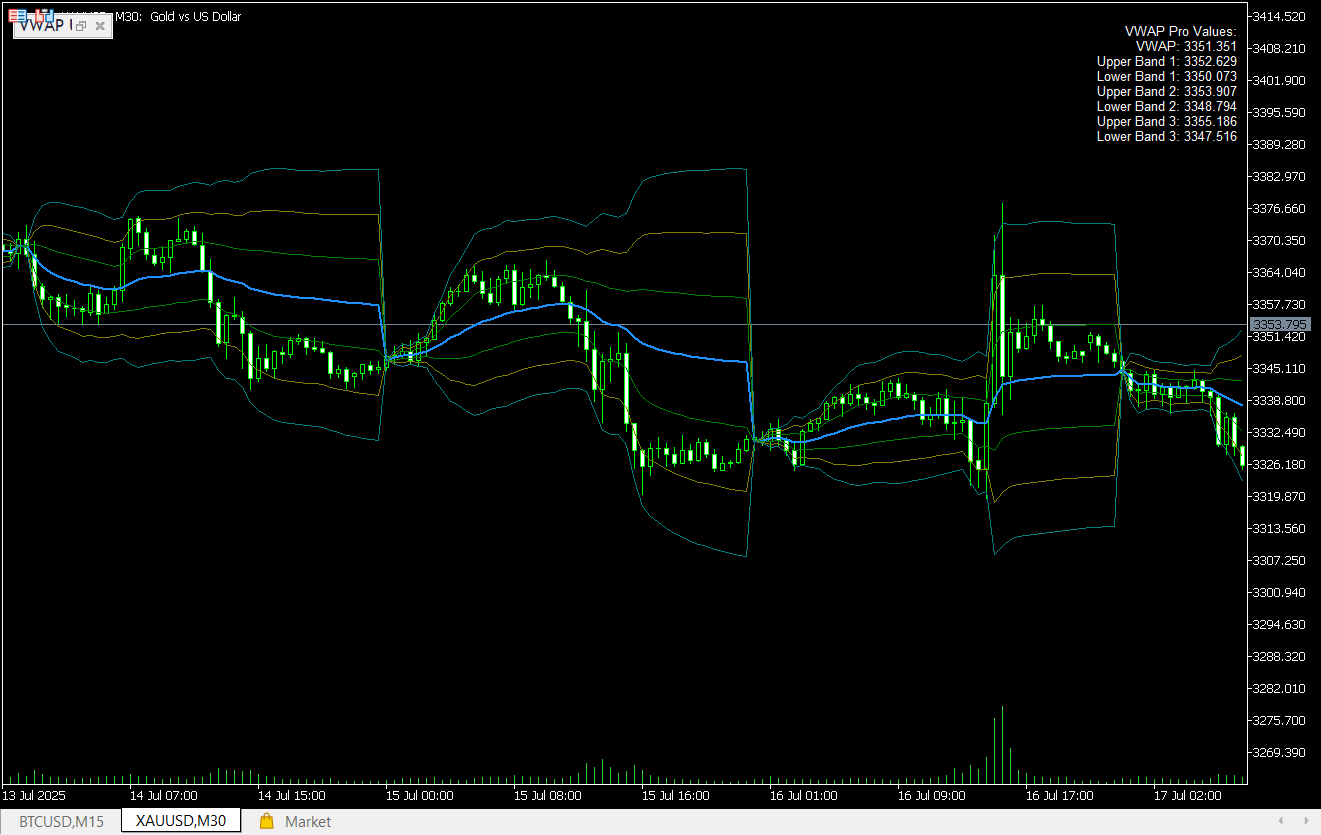
  • Dynamic Bands (σ1 – σ3 or %‑primarily based) spotlight statistically stretched costs — excellent for fade or breakout performs.

Fast‑Begin in 30 Seconds

If you drop the indicator on a chart:

  1. Do nothing — default preset exhibits Session VWAP with σ1–σ3 deviation bands.
  2. Search for value interactions: • Bounce off VWAP ⇒ development probably intact • Shut under VWAP + σ1 cross ⇒ momentum reversal
  3. Elective: Toggle alerts with one click on within the GUI.
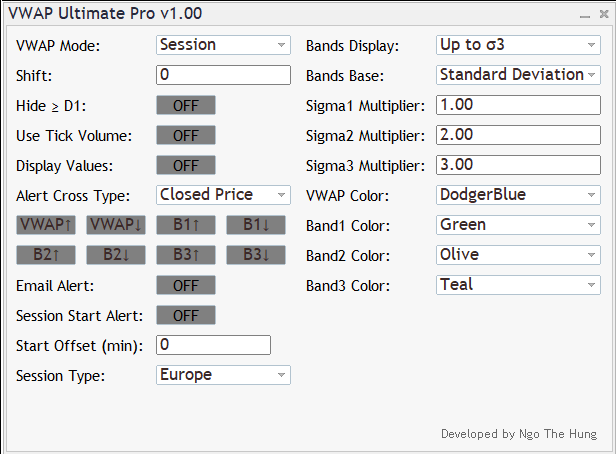
The Management Panel — Each Button Defined

Management Description / When to Use
VWAP Mode Choose Day by day, Weekly, Month-to-month, Quarterly, Yearly, Session, Anchored. Tip: Anchored VWAP turns into energetic while you set a Customized Anchor date‑time.
Bands Show Present None, as much as σ1/σ2/σ3. Deviation values auto‑replace in actual‑time.
Bands Base Customary Deviation (default) or Share of VWAP — nice for property with irregular volatility.
Shift Transfer all traces left/proper (helpful for screenshot annotations).
Cover ≥ D1 Toggle OFF to disable drawing on Day by day/Weekly charts (retains your greater‑TF clear).
Show Values Exhibits a compact legend (VWAP & bands) within the prime‑proper nook.
Use Tick Quantity In case your dealer lacks actual quantity, allow to make use of tick quantity as a substitute.
▼ ALERT SECTION ▼
Alert Cross Sort Present Value = alert fires immediately; Closed Value = fires solely on candle shut.
VWAP↑ / VWAP↓ Toggle alert on upward / downward VWAP cross.
B1↑ B1↓ … B3↓ Similar for σ1‑σ3 bands.
Session Begin Alert Notify X minutes earlier than session open (set offset under).
E mail Alert Activate/off e mail supply. See part 6 to configure SMTP.

Color Pickers are self‑explanatory — match your chart theme in seconds.

Sensible Buying and selling Situations

5.1 Intraday Imply‑Reversion

  • Timeframe: M5–M15, Session VWAP.
  • Search for value poking σ2/σ3 then snapping again towards VWAP.
  • Enter within the excessive band, goal VWAP, cease exterior σ3.

5.2 Pattern Continuation

  • Anchored VWAP from a information candle low.
  • Keep lengthy whereas value > anchored VWAP; add on σ1 pullbacks.

5.3 Breakout Affirmation

  • Day by day VWAP on M30.
  • Solely take breakouts in course of VWAP slope.
Alert Centre & E mail / Push Configuration

  1. Push: In MT5, Instruments → Choices → Notifications → test “Allow Push” and enter your MetaQuotes ID.
  2. E mail: Instruments → Choices → E mail → fill SMTP particulars → tick “Allow”.
    The E mail Alert swap within the panel now sends fantastically formatted HTML messages.
  3. Reminder: In case you select Closed Value, alerts arrive solely after candle shut.

Suggestions, Efficiency Tweaks & FAQs

  • Lag? Disable σ2/σ3 bands or flip off Show Values on very low‑finish PCs.
  • Licensing: Every buy attaches to your MQL5 account for all times. Use on all MT5 terminals logged into the identical account.
  • Demo vs. Actual: Trial construct runs solely on demo accounts (message seems if used on dwell).
  • Does tick quantity distort VWAP? For top‑high quality FX brokers the correlation to actual quantity is robust sufficient for intraday work.
  • Can I anchor to NFP candle? Sure — swap mode to Anchored → choose date/time of the NFP bar.
  • save presets? After configuring, proper‑click on chart → Template → Save Template.

Need assistance or function requests?
Ship a personal message on MQL5 or Telegram.



Source link

Tags: AnalyticsForecastsGuideJulyMasterMT5ProStepByStepUltimateUserVWAP
Share196Tweet123
Previous Post

China bars US Commerce Dept. worker from leaving amid national security, trade tensions

Next Post

5 tips for building foundation models for AI

Investor News Today

Investor News Today

Next Post
5 tips for building foundation models for AI

5 tips for building foundation models for AI

  • Trending
  • Comments
  • Latest
Want a Fortell Hearing Aid? Well, Who Do You Know?

Want a Fortell Hearing Aid? Well, Who Do You Know?

December 3, 2025
Private equity groups prepare to offload Ensemble Health for up to $12bn

Private equity groups prepare to offload Ensemble Health for up to $12bn

May 16, 2025
The human harbor: Navigating identity and meaning in the AI age

The human harbor: Navigating identity and meaning in the AI age

July 14, 2025
Lars Windhorst’s Tennor Holding declared bankrupt

Lars Windhorst’s Tennor Holding declared bankrupt

June 18, 2025
Why America’s economy is soaring ahead of its rivals

Why America’s economy is soaring ahead of its rivals

0
Dollar climbs after Donald Trump’s Brics tariff threat and French political woes

Dollar climbs after Donald Trump’s Brics tariff threat and French political woes

0
Nato chief Mark Rutte’s warning to Trump

Nato chief Mark Rutte’s warning to Trump

0
Top Federal Reserve official warns progress on taming US inflation ‘may be stalling’

Top Federal Reserve official warns progress on taming US inflation ‘may be stalling’

0
Why Everyone Is Suddenly in a ‘Very Chinese Time’ in Their Lives

Why Everyone Is Suddenly in a ‘Very Chinese Time’ in Their Lives

January 20, 2026
IDR Candles Indicator – Trading Systems – 19 January 2026

IDR Candles Indicator – Trading Systems – 19 January 2026

January 19, 2026
Plus500 Halts New CFD Onboarding in Spain amid Tough Marketing Rules

Plus500 Halts New CFD Onboarding in Spain amid Tough Marketing Rules

January 19, 2026
Bitcoin Traders Defend $92K, But For How Long?

Bitcoin Traders Defend $92K, But For How Long?

January 19, 2026

Live Prices

© 2024 Investor News Today

No Result
View All Result
  • Home
  • Market
  • Business
  • Finance
  • Investing
  • Real Estate
  • Commodities
  • Crypto
  • Blockchain
  • Personal Finance
  • Tech

© 2024 Investor News Today