
• Latest
  • Trending
  • All
  • Market Updates
  • Cryptocurrency
  • Blockchain
  • Investing
  • Commodities
  • Personal Finance
  • Technology
  • Business
  • Real Estate
  • Finance
Is your Roku TV spying on you? It’s possible, but here’s how to put a stop to it

I changed 6 settings on my Roku TV to instantly give it a performance boost

February 3, 2026
Soft Manager – Trading Ideas – 5 August 2025

Why My AI EA Did Nothing While Gold Moved 500 Pips (And Why That’s Exactly Right) – My Trading – 3 February 2026

February 4, 2026
Deutsche Börse’s 360T Plugs Bitpanda Into FX Network to Channel Institutions Into Crypto

Deutsche Börse’s 360T Plugs Bitpanda Into FX Network to Channel Institutions Into Crypto

February 4, 2026
ETH’s Negative Funding Rates May Not Be A Buy Signal This Time

ETH’s Negative Funding Rates May Not Be A Buy Signal This Time

February 4, 2026
LG has discounted its Gram Pro laptop by $500 for a limited time (and you get a free monitor too)

LG has discounted its Gram Pro laptop by $500 for a limited time (and you get a free monitor too)

February 3, 2026
New Zealand Q4 2025 unemployment rate 5.4% (expected 5.3%, prior 5.3%)

New Zealand Q4 2025 unemployment rate 5.4% (expected 5.3%, prior 5.3%)

February 3, 2026
Bitcoin’s Network Growth Just Reached Extreme Levels Last Seen Before The 2021 Surge

Bitcoin’s Network Growth Just Reached Extreme Levels Last Seen Before The 2021 Surge

February 3, 2026
How To Budget When You Have An Irregular Income

How To Budget When You Have An Irregular Income

February 3, 2026
Here’s How Much $1000 Invested In Coeur Mining 10 Years Ago Would Be Worth Today – Coeur Mining (NYSE:CDE)

Here’s How Much You Would Have Made Owning Micron Technology Stock In The Last 5 Years – Micron Technology (NASDAQ:MU)

February 3, 2026
Stocks making the biggest moves midday: NVO, PLTR, AES, RKT

Stocks making the biggest moves midday: NVO, PLTR, AES, RKT

February 3, 2026
XAG/USD slides below $66, bullish setup intact

Silver surges as buyers return amid pullback, macro support

February 3, 2026
Galaxy Digital Reports $482M Net Loss in Q4 2025

Galaxy Digital Reports $482M Net Loss in Q4 2025

February 3, 2026
Waymo raises $16 billion to take its robotaxi business ‘global’

Waymo raises $16 billion to take its robotaxi business ‘global’

February 3, 2026
Wednesday, February 4, 2026
No Result
View All Result
InvestorNewsToday.com
  • Home
  • Market
  • Business
  • Finance
  • Investing
  • Real Estate
  • Commodities
  • Crypto
  • Blockchain
  • Personal Finance
  • Tech
InvestorNewsToday.com
No Result
View All Result
Home Blockchain

I changed 6 settings on my Roku TV to instantly give it a performance boost

by Investor News Today
February 3, 2026
in Blockchain
0
Is your Roku TV spying on you? It’s possible, but here’s how to put a stop to it
491
SHARES
1.4k
VIEWS
Share on FacebookShare on Twitter


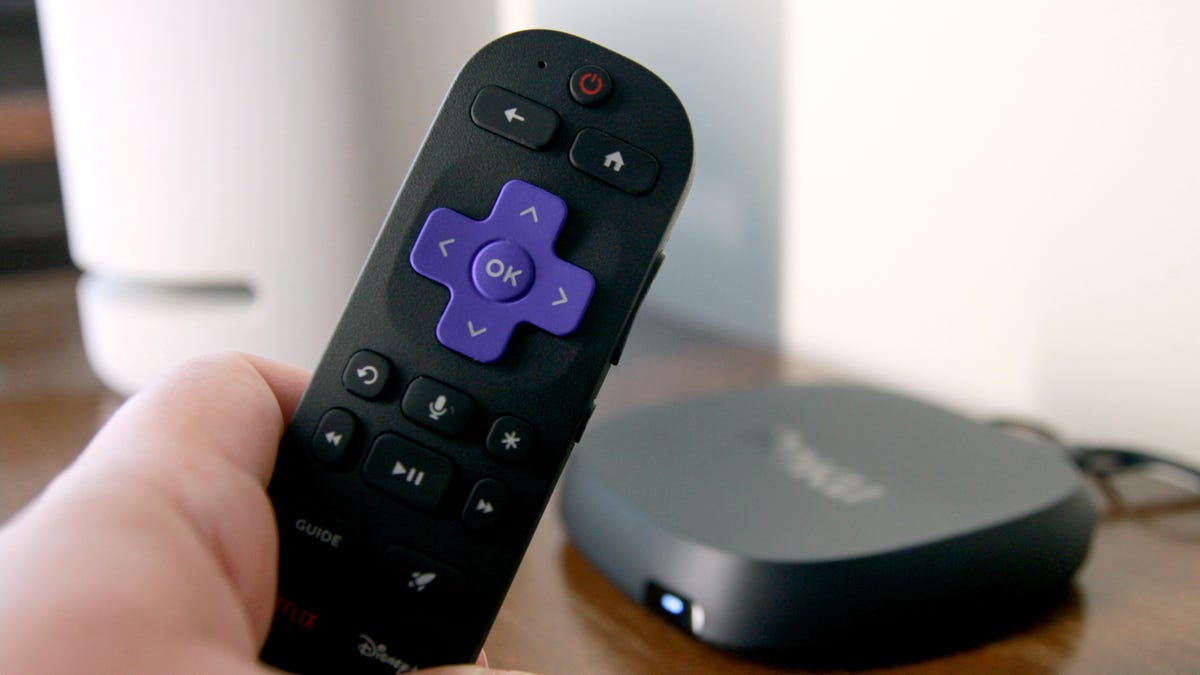
Roku Ultra
Elyse Betters Picaro / ZDNET

Comply with ZDNET: Add us as a most popular supply on Google.


Nothing kills the vibe of present quicker than the dreaded spinning icon or random freezes. In case your Roku TV is stuttering or buffering, do not hand over — this is the best way to repair it.

Additionally: I watched Roku’s free dwell TV channels, and it felt just like the cable I grew up with

Like telephones and computer systems, Rokus have caches that accumulate non permanent information, which inevitably slows them down over time. There are easy methods to clear up this hidden litter and get your Roku TV behaving like its regular, wholesome self.

Listed below are a couple of strategies to clear your Roku’s cache, enhance its pace, and make exhibits play easily once more.

1. Begin by unplugging it

Roku Streaming Stick
Maria Diaz/ZDNET

This one nearly sounds too simple to hassle with, nevertheless it’s generally step one tech troubleshooters take when fixing fussy units. Generally it even does the trick. Unplug the unit, stroll away for a couple of minutes to let all these digital pulses fizzle out, and plug it again in.

2. Restart through settings

This is not a manufacturing unit reset, however you will not need to do it in the course of watching “Yellow Jackets” as a result of your recurrently scheduled program will certainly be interrupted. Comply with these steps, and your TV ought to restart in about 30 seconds.

  • From the Residence display screen, go to Settings (on the finish of the record).
  • Choose System, then Energy.
  • Select System Restart and make sure by clicking Restart.

3. Restart through distant

If points persist after that fast repair, do that hidden operate through the use of the Roku distant. 

  • Go to the Residence menu, guaranteeing the Residence possibility on the left is highlighted.
  • Press the Residence button 5 occasions.
  • Press the Up arrow as soon as.
  • Press the Rewind button twice.
  • Press the Quick Ahead button twice.
  • Wait on your Roku to restart.

4. Uninstall and reinstall apps

Roku Streaming Stick
Kerry Wan/ZDNET

If you happen to’re having further hassle with a selected app that you just suspect is likely to be inflicting issues, it is a good suggestion to uninstall and reinstall it. You are able to do this for any variety of apps, however understand that reinstalling the app will erase all consumer information and settings, requiring an entire setup afterward.

Additionally: Which Roku streaming stick do you have to purchase in 2025? My selection is apparent

  • From the Residence display screen, spotlight the problematic app (don’t open it).
  • Press the * button in your distant.
  • Choose Take away Channel from the pop-up menu.
  • Reinstall the app, and take the time to set it up once more.

5. Reset your community connection

Your Wi-Fi sign could also be robust, however there might nonetheless be a hiccup in your device-to-network interface. There isn’t any hurt in giving it a shot, though the method will reboot your Roku and you may have to reenter your Wi-Fi password after it is accomplished. This can take away all community particulars, Wi-Fi passwords, and settings for each wired and wi-fi connections.

Needless to say if in case you have every other units linked to your Roku TV (corresponding to a soundbar or streaming stick), you could have to reconnect these units as nicely after doing a community connection reset.

  • Go to Settings from the principle menu.
  • Choose System, then Superior System Settings.
  • Select Community Connection Reset, then Reset Connection.
  • Wait on your Roku to restart.
  • Return to Community, then choose Set Up Connection. 
  • Choose Wi-fi and select your Wi-Fi community from the record.
  • Enter its password utilizing the on-screen keyboard and choose Join.

6. Reset the entire Roku TV

Doing a manufacturing unit reset for any machine is lots like treating a again damage with surgical procedure — a final resort — and no person desires to undergo with it. It’ll erase all of your private settings, consumer profiles, login credentials, and put in apps. If the above steps have not panned out, this is the best way to return your Roku to its authentic state.

Additionally: How one can clear the cache in your TV (and why it makes such an enormous distinction)

  • As above, go to Settings.
  • Choose System, then Superior System Settings.
  • Select Manufacturing facility Reset. A affirmation code will seem under the quantity pad on the precise.
  • Enter that quantity, then choose Begin Manufacturing facility Reset.
  • Your Roku will provoke the exhausting reset course of, and it’ll take a couple of minutes to totally reboot.

Hopefully, it will not come to this (the dreaded manufacturing unit reset), however it would undoubtedly work if wanted. By attempting among the prior strategies above, you’ve gotten likelihood of creating your Roku enjoyable to look at once more.




Source link

Tags: boostchangedgiveInstantlyPerformanceROKUSettings
Share196Tweet123
Previous Post

New Zealand Q4 2025 unemployment rate 5.4% (expected 5.3%, prior 5.3%)

Next Post

LG has discounted its Gram Pro laptop by $500 for a limited time (and you get a free monitor too)

Investor News Today

Investor News Today

Next Post
LG has discounted its Gram Pro laptop by $500 for a limited time (and you get a free monitor too)

LG has discounted its Gram Pro laptop by $500 for a limited time (and you get a free monitor too)

  • Trending
  • Comments
  • Latest
Want a Fortell Hearing Aid? Well, Who Do You Know?

Want a Fortell Hearing Aid? Well, Who Do You Know?

December 3, 2025
Private equity groups prepare to offload Ensemble Health for up to $12bn

Private equity groups prepare to offload Ensemble Health for up to $12bn

May 16, 2025
The human harbor: Navigating identity and meaning in the AI age

The human harbor: Navigating identity and meaning in the AI age

July 14, 2025
Lars Windhorst’s Tennor Holding declared bankrupt

Lars Windhorst’s Tennor Holding declared bankrupt

June 18, 2025
Why America’s economy is soaring ahead of its rivals

Why America’s economy is soaring ahead of its rivals

0
Dollar climbs after Donald Trump’s Brics tariff threat and French political woes

Dollar climbs after Donald Trump’s Brics tariff threat and French political woes

0
Nato chief Mark Rutte’s warning to Trump

Nato chief Mark Rutte’s warning to Trump

0
Top Federal Reserve official warns progress on taming US inflation ‘may be stalling’

Top Federal Reserve official warns progress on taming US inflation ‘may be stalling’

0
Soft Manager – Trading Ideas – 5 August 2025

Why My AI EA Did Nothing While Gold Moved 500 Pips (And Why That’s Exactly Right) – My Trading – 3 February 2026

February 4, 2026
Deutsche Börse’s 360T Plugs Bitpanda Into FX Network to Channel Institutions Into Crypto

Deutsche Börse’s 360T Plugs Bitpanda Into FX Network to Channel Institutions Into Crypto

February 4, 2026
ETH’s Negative Funding Rates May Not Be A Buy Signal This Time

ETH’s Negative Funding Rates May Not Be A Buy Signal This Time

February 4, 2026
LG has discounted its Gram Pro laptop by $500 for a limited time (and you get a free monitor too)

LG has discounted its Gram Pro laptop by $500 for a limited time (and you get a free monitor too)

February 3, 2026

Live Prices

© 2024 Investor News Today

No Result
View All Result
  • Home
  • Market
  • Business
  • Finance
  • Investing
  • Real Estate
  • Commodities
  • Crypto
  • Blockchain
  • Personal Finance
  • Tech

© 2024 Investor News Today