
• Latest
  • Trending
  • All
  • Market Updates
  • Cryptocurrency
  • Blockchain
  • Investing
  • Commodities
  • Personal Finance
  • Technology
  • Business
  • Real Estate
  • Finance
I found a way to roll back buggy Google Services updates on Android – in just a few clicks

I found a way to roll back buggy Google Services updates on Android – in just a few clicks

April 16, 2026
NAGA Group Pitches AI-First Model Ahead of Q1 Earnings as Xetra Shares Rebound

NAGA Group Pitches AI-First Model Ahead of Q1 Earnings as Xetra Shares Rebound

April 16, 2026
Netflix earnings is tonight. Are you holding?

Netflix earnings is tonight. Are you holding?

April 16, 2026
Cato Scholar Calls For Ending to Bitcoin Capital Gains Tax

Cato Scholar Calls For Ending to Bitcoin Capital Gains Tax

April 16, 2026
Tether adds 951 BTC, stash nears 97K – What’s the strategy?

Tether adds 951 BTC, stash nears 97K – What’s the strategy?

April 16, 2026
Student loan borrowers struggle to access debt forgiveness, repayment

Student loan borrowers struggle to access debt forgiveness, repayment

April 16, 2026
Wells Fargo & Company Q1 2026 Earnings Call Summary

Wells Fargo & Company Q1 2026 Earnings Call Summary

April 16, 2026
Allbirds announced a switch from shoes to AI and its stock jumped 600 percent

Allbirds announced a switch from shoes to AI and its stock jumped 600 percent

April 16, 2026
Soft Manager – Trading Ideas – 5 August 2025

Daily Gold Journal: Thursday, April 16, 2026 – Analytics & Forecasts – 16 April 2026

April 16, 2026
Japan’s Katayama says she discussed FX with Bessent and agreed to keep close dialogue

Japan’s Katayama says she discussed FX with Bessent and agreed to keep close dialogue

April 16, 2026
Bitcoin Should Prepare For Quantum Despite No Looming Threat

Bitcoin Should Prepare For Quantum Despite No Looming Threat

April 16, 2026
Airwallex is about to take on Stripe and the rest of the payments industry — in the physical world

Airwallex is about to take on Stripe and the rest of the payments industry — in the physical world

April 16, 2026
Stocks making the biggest moves midday: DASH, HOOD, AVGO, SNDK

Stocks making the biggest moves midday: DASH, HOOD, AVGO, SNDK

April 15, 2026
Thursday, April 16, 2026
No Result
View All Result
InvestorNewsToday.com
  • Home
  • Market
  • Business
  • Finance
  • Investing
  • Real Estate
  • Commodities
  • Crypto
  • Blockchain
  • Personal Finance
  • Tech
InvestorNewsToday.com
No Result
View All Result
Home Blockchain

I found a way to roll back buggy Google Services updates on Android – in just a few clicks

by Investor News Today
April 16, 2026
in Blockchain
0
I found a way to roll back buggy Google Services updates on Android – in just a few clicks
492
SHARES
1.4k
VIEWS
Share on FacebookShare on Twitter


Android System Services
Jack Wallen/ZDNET

Comply with ZDNET: Add us as a most popular supply on Google.


ZDNET’s key takeaways

  • If a Google Companies replace is inflicting issues, there is a fast repair
  • With the faucet of a button, you’ll be able to roll again sure updates.
  • Use this rigorously, and it might get you out of a jam.

Over the previous decade, there have been a handful of events when an Android replace wreaked havoc on my telephone. As soon as, it was so unhealthy that I needed to do a manufacturing unit reset and begin over.

Not very best.

There have additionally been conditions the place an replace did not trigger catastrophic issues, however did give me a headache or two. For instance, a Google Play Companies replace led to the lack to put in apps. That difficulty wasn’t resolved till Google pushed an replace to the service.

Additionally: Tips on how to use Google Messages’ new Trash function to recuperate deleted texts

The excellent news is that there is a considerably hidden part in Android the place you’ll be able to roll again updates for almost any Google service.

For instance, if Android WebView (the service that allows you to view internet pages inside an app) out of the blue stops working appropriately, you would roll again the replace, and the service will work as anticipated once more.

When you roll again a service, and it would not repair your telephone (and no different possibility has solved the issue), first ensure you rolled again the best service. Your last-ditch effort could be a manufacturing unit reset, as there isn’t any option to roll again a full Android replace.

Be aware that the next instructions concern solely Google Companies, so you will not discover updates for put in consumer apps right here. (For that, you’d go to Settings > Apps > All Apps. If an app is inflicting hassle in your telephone, merely uninstall it.)

Additionally: Sluggish Android telephone? My 4-step refresh routine can velocity it up quick

With that in thoughts, let’s check out the place this hidden possibility for rolling again Google Companies is situated and use it.

The place is that this rollback function?

I stumbled upon this function by chance, so you do not have to spend time on the lookout for it!

On Pixel, open the Settings app and go to Google companies and preferences NAME > All companies > Privateness & safety > System companies (the place NAME is the title related along with your telephone). On Samsung, attempt Settings > Google companies > All companies > System companies.

Android System Services
Screenshot by Jack Wallen/ZDNET

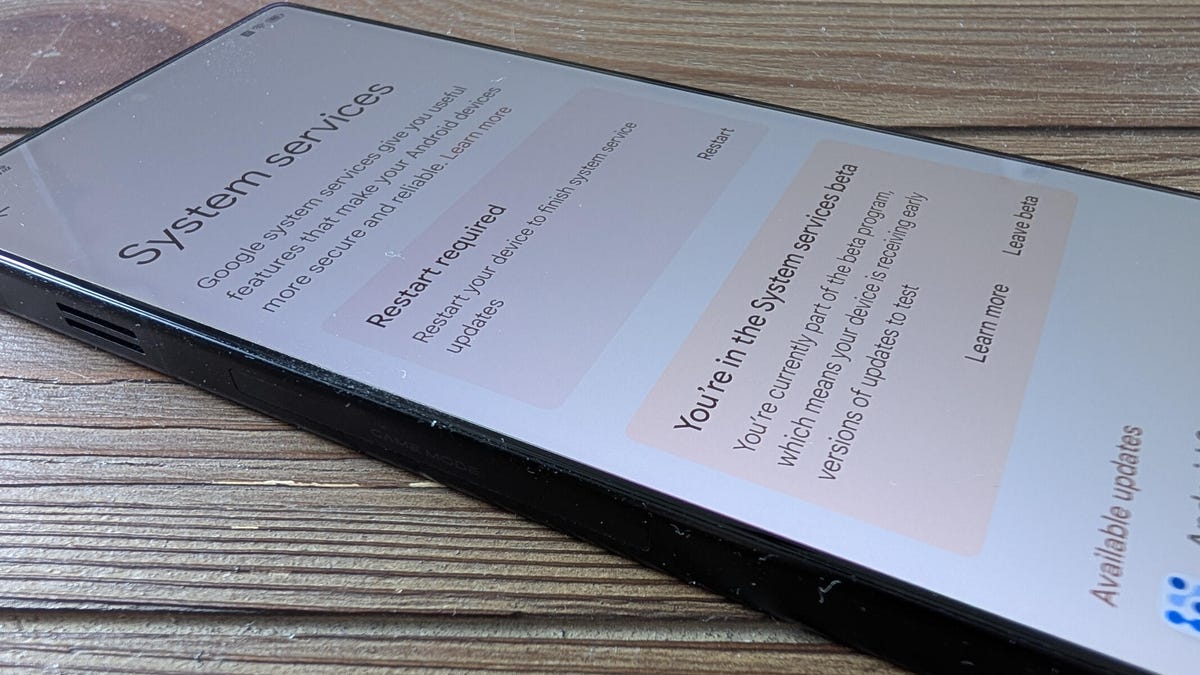
On the “System companies” web page, you may discover a listing of all up-to-date companies and people with accessible updates.

Android System Services

I occur to be within the System Companies beta program, so I get updates pretty rapidly.

Screenshot by Jack Wallen/ZDNET

When you discover a service with an accessible replace, faucet the service title, then faucet Replace.

Additionally: I modified 12 settings on my Android telephone to increase its battery life by hours

To roll again an replace, find and faucet the service you need to roll again. On the service’s web page, you need to see a button labeled “Take away replace.” To roll that service again to a earlier model, faucet that button, confirm the uninstall when prompted, and await the replace to be rolled again.

Android System Services

Be sure you know what you are doing earlier than you roll again a service replace.

Screenshot by Jack Wallen/ZDNET

Relying on the service, you would possibly have to reboot your telephone for the method to finish.

Perceive that this isn’t a treatment for every thing ailing your Android telephone. What this does is provide you with management over Google Service updates that is likely to be inflicting points along with your system. 

When you roll again an replace and discover it wasn’t the reason for your drawback, you’ll be able to return to that very same service and manually run the replace to revive it to its earlier state.




Source link

Tags: AndroidbuggyclicksGoogleRollServicesupdates
Share197Tweet123
Previous Post

Daily Gold Journal: Thursday, April 16, 2026 – Analytics & Forecasts – 16 April 2026

Next Post

Allbirds announced a switch from shoes to AI and its stock jumped 600 percent

Investor News Today

Investor News Today

Next Post
Allbirds announced a switch from shoes to AI and its stock jumped 600 percent

Allbirds announced a switch from shoes to AI and its stock jumped 600 percent

  • Trending
  • Comments
  • Latest
Want a Fortell Hearing Aid? Well, Who Do You Know?

Want a Fortell Hearing Aid? Well, Who Do You Know?

December 3, 2025
Private equity groups prepare to offload Ensemble Health for up to $12bn

Private equity groups prepare to offload Ensemble Health for up to $12bn

May 16, 2025
Lars Windhorst’s Tennor Holding declared bankrupt

Lars Windhorst’s Tennor Holding declared bankrupt

June 18, 2025
The human harbor: Navigating identity and meaning in the AI age

The human harbor: Navigating identity and meaning in the AI age

July 14, 2025
Why America’s economy is soaring ahead of its rivals

Why America’s economy is soaring ahead of its rivals

0
Dollar climbs after Donald Trump’s Brics tariff threat and French political woes

Dollar climbs after Donald Trump’s Brics tariff threat and French political woes

0
Nato chief Mark Rutte’s warning to Trump

Nato chief Mark Rutte’s warning to Trump

0
Top Federal Reserve official warns progress on taming US inflation ‘may be stalling’

Top Federal Reserve official warns progress on taming US inflation ‘may be stalling’

0
NAGA Group Pitches AI-First Model Ahead of Q1 Earnings as Xetra Shares Rebound

NAGA Group Pitches AI-First Model Ahead of Q1 Earnings as Xetra Shares Rebound

April 16, 2026
Netflix earnings is tonight. Are you holding?

Netflix earnings is tonight. Are you holding?

April 16, 2026
Cato Scholar Calls For Ending to Bitcoin Capital Gains Tax

Cato Scholar Calls For Ending to Bitcoin Capital Gains Tax

April 16, 2026
Tether adds 951 BTC, stash nears 97K – What’s the strategy?

Tether adds 951 BTC, stash nears 97K – What’s the strategy?

April 16, 2026

Live Prices

© 2024 Investor News Today

No Result
View All Result
  • Home
  • Market
  • Business
  • Finance
  • Investing
  • Real Estate
  • Commodities
  • Crypto
  • Blockchain
  • Personal Finance
  • Tech

© 2024 Investor News Today