
• Latest
  • Trending
  • All
  • Market Updates
  • Cryptocurrency
  • Blockchain
  • Investing
  • Commodities
  • Personal Finance
  • Technology
  • Business
  • Real Estate
  • Finance
Need to manage virtual machines on Linux? I found an easier way

Need to manage virtual machines on Linux? I found an easier way

January 27, 2026
Recovery potential after geopolitical de-escalation – OCBC

Recovery potential after geopolitical de-escalation – OCBC

April 28, 2026
Bitcoin Coinbase Premium Index Turns Negative As Net Taker Volume Falls By $829M

Bitcoin Coinbase Premium Index Turns Negative As Net Taker Volume Falls By $829M

April 28, 2026
Microsoft finally open sources DOS 1.0 – and it’s so much more than the code

Microsoft finally open sources DOS 1.0 – and it’s so much more than the code

April 28, 2026
Over 80% of US government agencies already use AI agents – and it’s only the beginning

Over 80% of US government agencies already use AI agents – and it’s only the beginning

April 28, 2026
Private survey inventory shows a huge headline crude oil draw vs. build expected

Private survey inventory shows a huge headline crude oil draw vs. build expected

April 28, 2026
Trump’s Bitcoin Reserve Could Be Near As White House Signals Major Update

Trump’s Bitcoin Reserve Could Be Near As White House Signals Major Update

April 28, 2026
Women tend to be ‘risk-appropriate’ investors: Women’s World Banking CEO

Women tend to be ‘risk-appropriate’ investors: Women’s World Banking CEO

April 28, 2026
The Rise of Arrogant Listing Agents in A Hot Real Estate Market

The Rise of Arrogant Listing Agents in A Hot Real Estate Market

April 28, 2026
Trump Tariff Tracker: Latest Rates on Countries and Products

Trump Tariff Tracker: Latest Rates on Countries and Products

April 28, 2026
Stocks making the biggest moves premarket: ORCL, GM, KO, SPOT

Stocks making the biggest moves premarket: ORCL, GM, KO, SPOT

April 28, 2026
investingLive Americas market news wrap: Iran says Hormuz is open, oil plunges

Iran expected to submit revised peace proposal soon – report

April 28, 2026
Galaxy Posts $216M Q1 Loss as Helios Expansion Advances

Galaxy Posts $216M Q1 Loss as Helios Expansion Advances

April 28, 2026
Wednesday, April 29, 2026
No Result
View All Result
InvestorNewsToday.com
  • Home
  • Market
  • Business
  • Finance
  • Investing
  • Real Estate
  • Commodities
  • Crypto
  • Blockchain
  • Personal Finance
  • Tech
InvestorNewsToday.com
No Result
View All Result
Home Blockchain

Need to manage virtual machines on Linux? I found an easier way

by Investor News Today
January 27, 2026
in Blockchain
0
Need to manage virtual machines on Linux? I found an easier way
492
SHARES
1.4k
VIEWS
Share on FacebookShare on Twitter


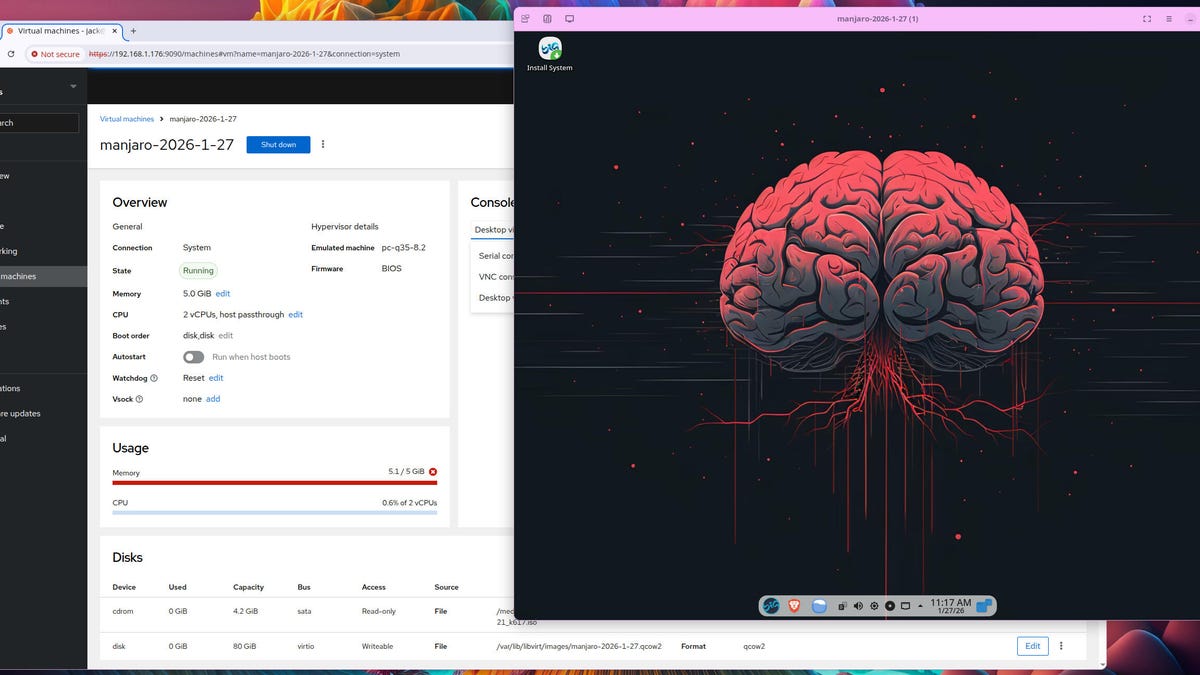
cockpitvm4
Jack Wallen/ZDNET

Observe ZDNET: Add us as a most well-liked supply on Google.


ZDNET’s key takeaways

  • Cockpit provides a straightforward approach to handle digital machines.
  • As soon as put in, this methodology is straightforward and versatile.
  • Cockpit is free to make use of.

I lately wrote about my migration away from VirtualBox to KVM/Virt-Machine for my digital machine wants. I’ve discovered these instruments to be far superior (albeit with a bit extra of a studying curve) than VirtualBox.

Since then, nevertheless, I’ve discovered one other methodology of working with KVM (the Linux kernel digital machine know-how), one which not solely permits me to create and handle digital machines on my native laptop, but in addition from any machine on my LAN.

That instrument is Cockpit, which makes managing your Linux machines significantly simpler.

Additionally: The very best Linux distributions for newcomers: Skilled examined and reviewed

Cockpit may be put in on nearly any Linux distribution and has a digital machines plugin you possibly can add into the combo. With this plugin, you possibly can:

  • Create new digital machines
  • Import digital machines
  • Begin digital machines
  • View digital machines
  • Insert disks right into a digital machine
  • Add community interfaces to a digital machine
  • And rather more

The Cockpit/Digital Machines mixture could be very highly effective and fairly helpful.

Let me present you how one can set up and use it.

Putting in Cockpit

What you will want: I will set up and run Cockpit on my primary Pop!_OS set up. You may set up Cockpit on different distros along with your default bundle supervisor (comparable to dnf and pacman). Apart from the Linux distro, you will additionally want a consumer with sudo privileges.

Let’s make this occur.

Set up Cockpit with the next command:

Present extra

sudo apt-get set up cockpit -y

Subsequent, set up the digital machines plugin with the command:

Present extra

sudo apt-get set up cockpit-machines -y

You possibly can additionally set up each of these packages with the one command:

sudo apt-get set up cockpit cockpit-machines -y

You are now able to rock.

Utilizing Cockpit for digital machines

After putting in Cockpit, you entry it from inside your net browser by pointing it to http://IP:9090 (the place IP is the IP tackle of the machine working Cockpit). Because it wasn’t put in with an SSL certificates, you will want to simply accept the “danger” and proceed. How this works will rely on the net browser you employ. 

Additionally: 5 of my favourite Linux distros prepared to make use of out of the field – no setup required

Chrome's not private warning.

No matter what browser you employ, you will must okay accessing the insecure web site.

Jack Wallen/ZDNET

For instance, if you happen to’re utilizing Chrome, you might click on Superior after which “Proceed to IP (unsafe)” the place IP is the IP tackle.

You may then be introduced with the Cockpit login display screen, the place you possibly can kind your Linux username and password to entry the system.

Cockpit login screen.

Login along with your normal consumer.

Jack Wallen/ZDNET

In the event you’re introduced with a button labeled “Activate administrative entry,” click on that and, when prompted, kind your username/password once more.

Additionally: My 11 favourite Linux distributions of all time, ranked

Within the left sidebar, you need to see an entry labeled “Digital machines.” Click on that, and also you’re able to handle your VMs.

Cockpit Machines section.

As you possibly can see, I have already got some digital machines created.

Jack Wallen/ZDNET

Top-of-the-line issues about managing your VMs this fashion is that you may decide to have Cockpit obtain the mandatory ISO for the machine. To try this, click on Create VM. Within the ensuing window, give the VM a singular identify, depart “Set up kind” set to “Obtain an OS.” 

Cockpit create new virtual machine window.

I might recommend going with the native ISO choice for reliability.

Jack Wallen/ZDNET

From the “Working system” drop-down, choose the Linux distribution you need to use. The one caveat to this methodology is that a number of the distribution releases are outdated. In the event you do not discover the model (or distro) that you really want, choose Native Set up Media from the “Set up kind” drop-down, after which you possibly can find your ISO picture from the “Working system” drop-down.

Configure the remainder of your VM (storage, storage restrict, and reminiscence) after which click on “Create and run” on the backside of the pop-up. I did run into points with the obtain choice, the place it was unable to find the ISO picture. Due to that, I all the time obtain the ISO manually.

Additionally: 5 causes to modify to an immutable Linux distro in the present day – and which to attempt first

You may then choose to view the working VM by the use of the Desktop viewer, VNC console, or the Serial console. The VNC console runs the VM from inside the browser, and the Desktop viewer downloads a file, which, when you click on on it, will open the desktop viewer. Regardless of which viewer you select, you possibly can then stroll by means of the method of putting in the OS.

As soon as the set up is completed, reboot, and also you’re prepared to begin working along with your digital machine. You are able to do this from inside Cockpit and even return to your desktop and run it from inside Virt-Supervisor if you happen to like.




Source link

Tags: EasierLinuxMachinesManageVirtual
Share197Tweet123
Previous Post

Oil challenges the highs of the year with eyes on weather and Iran

Next Post

Move over, Claude: Moonshot’s new AI model lets you vibe-code from a single video upload

Investor News Today

Investor News Today

Next Post
Move over, Claude: Moonshot’s new AI model lets you vibe-code from a single video upload

Move over, Claude: Moonshot's new AI model lets you vibe-code from a single video upload

  • Trending
  • Comments
  • Latest
Want a Fortell Hearing Aid? Well, Who Do You Know?

Want a Fortell Hearing Aid? Well, Who Do You Know?

December 3, 2025
Private equity groups prepare to offload Ensemble Health for up to $12bn

Private equity groups prepare to offload Ensemble Health for up to $12bn

May 16, 2025
Lars Windhorst’s Tennor Holding declared bankrupt

Lars Windhorst’s Tennor Holding declared bankrupt

June 18, 2025
The human harbor: Navigating identity and meaning in the AI age

The human harbor: Navigating identity and meaning in the AI age

July 14, 2025
Why America’s economy is soaring ahead of its rivals

Why America’s economy is soaring ahead of its rivals

0
Dollar climbs after Donald Trump’s Brics tariff threat and French political woes

Dollar climbs after Donald Trump’s Brics tariff threat and French political woes

0
Nato chief Mark Rutte’s warning to Trump

Nato chief Mark Rutte’s warning to Trump

0
Top Federal Reserve official warns progress on taming US inflation ‘may be stalling’

Top Federal Reserve official warns progress on taming US inflation ‘may be stalling’

0
Recovery potential after geopolitical de-escalation – OCBC

Recovery potential after geopolitical de-escalation – OCBC

April 28, 2026
Bitcoin Coinbase Premium Index Turns Negative As Net Taker Volume Falls By $829M

Bitcoin Coinbase Premium Index Turns Negative As Net Taker Volume Falls By $829M

April 28, 2026
Microsoft finally open sources DOS 1.0 – and it’s so much more than the code

Microsoft finally open sources DOS 1.0 – and it’s so much more than the code

April 28, 2026
Over 80% of US government agencies already use AI agents – and it’s only the beginning

Over 80% of US government agencies already use AI agents – and it’s only the beginning

April 28, 2026

Live Prices

© 2024 Investor News Today

No Result
View All Result
  • Home
  • Market
  • Business
  • Finance
  • Investing
  • Real Estate
  • Commodities
  • Crypto
  • Blockchain
  • Personal Finance
  • Tech

© 2024 Investor News Today